


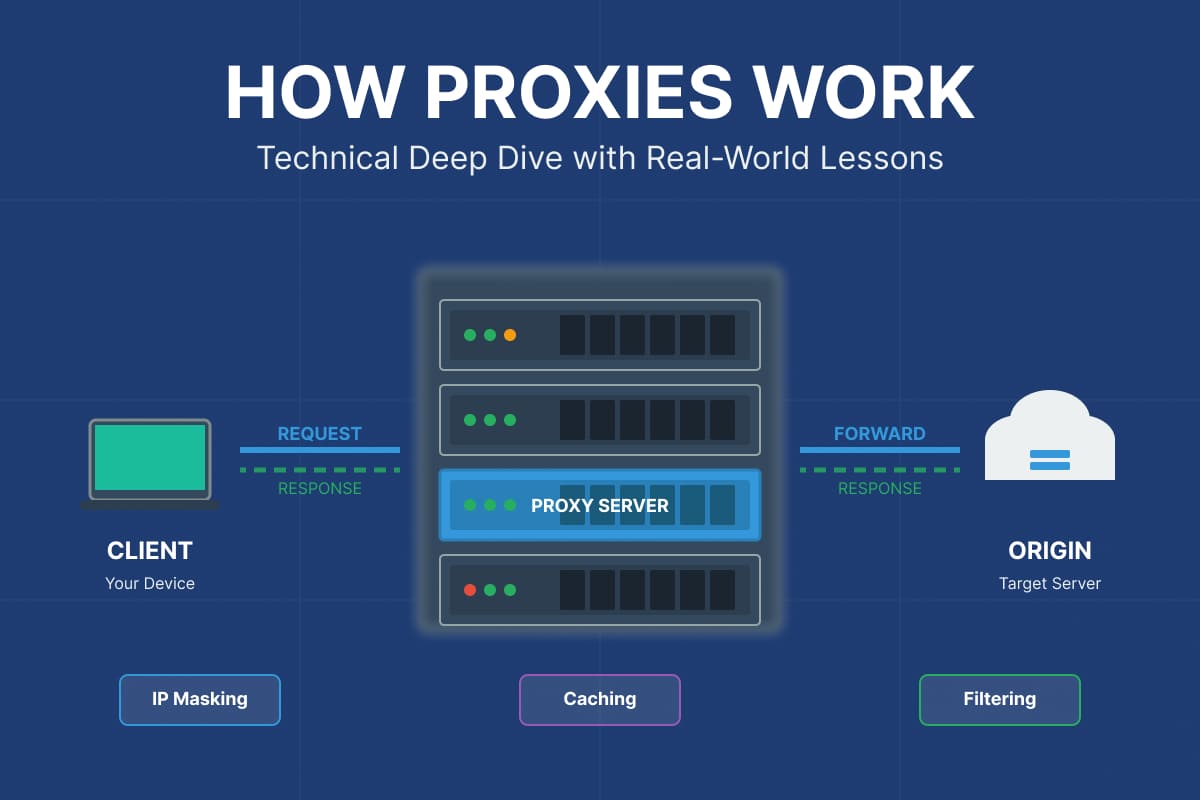
Proxies are intermediary servers that route your internet traffic, offering privacy, performance gains, and access control. While they share some similarities with VPN servers, proxies work differently and serve distinct purposes. This guide explains how they work technically, when to use proxies versus VPN servers, and shares hard-learned lessons from deploying proxies in production—including the costly mistakes to avoid.
What Proxies Really Do (Beyond the Basics)
A proxy server acts as an intermediary between your device and the destination server. But here’s what makes proxies genuinely useful: they don’t just forward traffic—they can transform, cache, filter, or mask it entirely.
In my experience deploying proxies across multiple projects, I’ve seen them reduce server loads by 60-70% through intelligent caching, but I’ve also watched improperly configured proxies leak sensitive data and crash under load. The difference comes down to understanding what proxies can and cannot do.
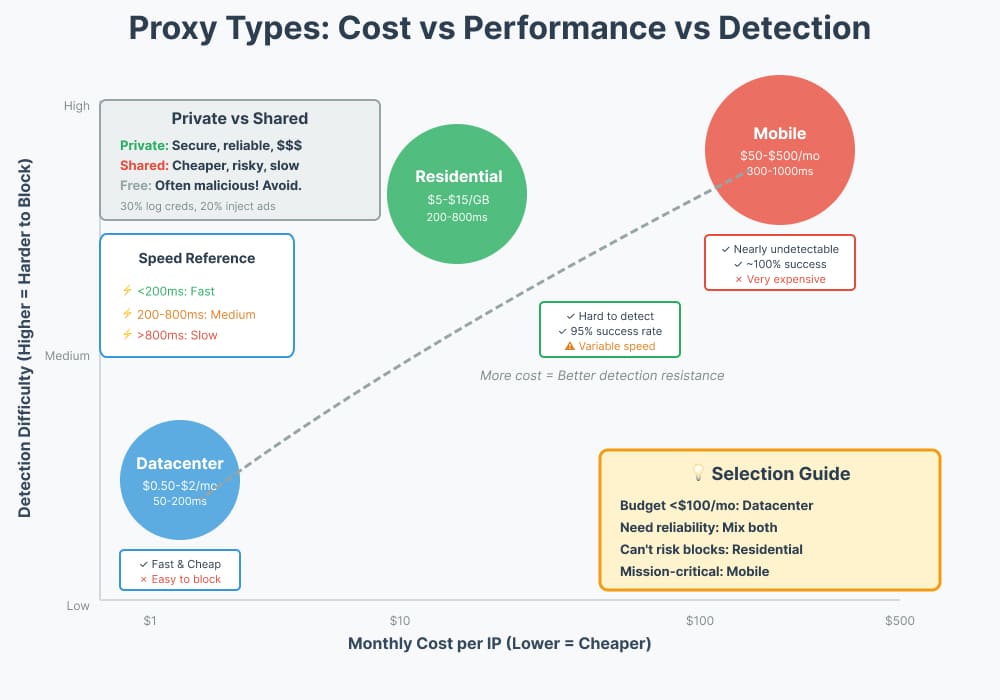
Here’s the fundamental principle: every proxy creates a two-hop path instead of a direct connection. This introduces latency (typically 20-100ms additional delay) but unlocks capabilities impossible with direct connections:
- IP masking for privacy or geo-restriction bypassing
- Request caching to reduce bandwidth costs (I’ve seen monthly savings of $3,000+ on medium-traffic sites)
- Content filtering and access control for corporate compliance
- Load distribution across multiple origin servers
- Traffic inspection for security monitoring
 The Technical Mechanics: How Traffic Flows Through a Proxy
Understanding proxy mechanics requires looking at the protocol level. When you configure your browser to use a proxy at 192.168.1.100:8080, here’s the actual sequence:
Step 1: Client sends request to proxy
Instead of connecting directly to example.com, your browser sends:
CONNECT example.com:443 HTTP/1.1
Host: example.com
Step 2: Proxy evaluates and forwards
The proxy server checks authentication, applies any filtering rules, then opens a separate TCP connection to example.com. This is crucial: the proxy makes an independent connection, not just a passthrough.
Step 3: Origin responds to proxy
Example.com sees the proxy’s IP address (say, 203.0.113.5), not yours. The response goes to the proxy first.
Step 4: Proxy returns response to client
The proxy can now cache the response, modify headers, or simply forward it unchanged.
This separation creates three critical consequences I’ve observed in production:
- Latency compounds: Each hop adds 10-50ms. Chain multiple proxies and you’ll feel it.
- IP attribution changes: The origin server logs the proxy’s IP, complicating analytics and rate limiting.
- Failure points multiply: Either connection (client↔proxy or proxy↔origin) can fail independently.
 HTTP vs HTTPS vs SOCKS: Choosing the Right Protocol
The protocol your proxy uses fundamentally changes what it can do. I’ve made the mistake of using HTTP proxies for HTTPS traffic and spent hours debugging why SSL wasn’t working properly. Here’s what actually matters:
HTTP Proxies
- Understand HTTP headers and can rewrite them
- Can cache content intelligently based on Cache-Control headers
- Cannot read HTTPS content without TLS termination
- Best for: web scraping, caching, basic URL filtering
- Performance: Minimal overhead, typically <10ms latency
HTTPS Proxies (with CONNECT method)
- Create encrypted tunnels without inspecting content
- Preserve end-to-end encryption between client and origin
- Cannot cache HTTPS content or inspect requests
- Best for: privacy-focused browsing, maintaining SSL integrity
- Performance: Slight overhead from additional TLS handshake
SOCKS Proxies (especially SOCKS5)
- Protocol-agnostic—works with HTTP, FTP, SSH, anything TCP/UDP
- No protocol-level understanding, just raw packet forwarding
- Support UDP for applications like DNS or gaming
- Cannot do caching, header modification, or content inspection
- Best for: tunneling non-HTTP protocols, maximum flexibility
- Performance: Lowest overhead, good for high-throughput scenarios
Real-world decision matrix from my projects:
- Web scraping with caching needs: HTTP proxy
- Maintaining full SSL integrity: HTTPS proxy with CONNECT
- Tunneling SSH or custom protocols: SOCKS5
- Corporate traffic inspection: HTTP proxy with TLS termination (requires certificate management)
Forward vs Reverse Proxies: Different Problems, Different Solutions
This distinction confuses many people, but it’s actually straightforward:
Forward Proxy = Client’s Agent
Sits on the client side. You configure your browser/app to use it. The origin server sees the proxy’s IP, not yours.
Example use case: At a previous company, we deployed Squid forward proxies for 200+ employees. Benefits we measured:
- 45% reduction in external bandwidth usage (aggressive caching)
- Blocked 12,000+ requests to malware/phishing sites monthly
- Enabled auditing for compliance (financial services requirement)
Configuration looked like:
Browser settings → Manual proxy: proxy.company.com:3128Reverse Proxy = Server’s Shield
Sits in front of origin servers. Clients connect to it without knowing. The proxy’s IP is the public-facing address.
Example use case: I implemented Nginx reverse proxies for a high-traffic content site. Measurable results:
- Page load times dropped from 1.2s to 0.4s (static asset caching)
- Server capacity increased 3x without hardware changes
- SSL termination offloaded crypto overhead from application servers
- Zero-downtime deployments became possible (proxy routes to healthy backends)
Configuration looked like:
User → proxy.example.com (public IP) → internal servers (10.0.1.x)The key insight: forward proxies serve client needs (privacy, filtering), reverse proxies serve server needs (performance, security, scaling).
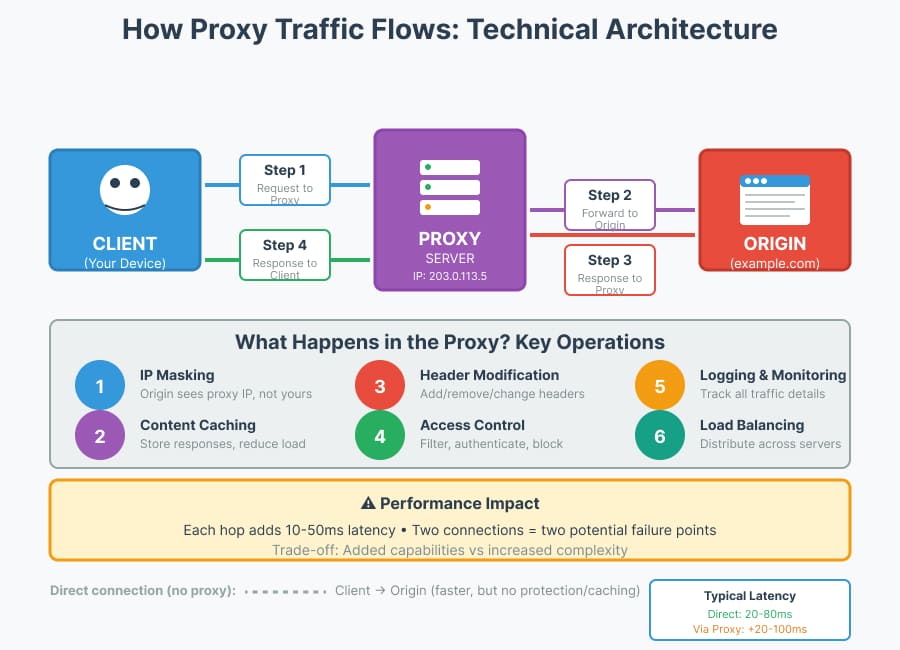
Datacenter vs Residential vs Mobile Proxies: The Real Trade-Offs
Proxy providers love to advertise features, but here’s what actually matters based on testing hundreds of proxy services:
Datacenter Proxies
What they are: Hosted in AWS, DigitalOcean, OVH, etc.
- Speed: 50-200ms latency, consistently fast
- Cost: $0.50-$2 per IP per month (sometimes less in bulk)
- Detection: Easily identified via IP range checks, ASN lookups
- Blocking: Many sites (Nike, Ticketmaster, etc.) auto-block datacenter IPs
- Best for: Price-sensitive bulk tasks, low-detection scenarios
Real experience: I used datacenter proxies for monitoring competitor prices. Worked great for 80% of targets, but premium retailers blocked them instantly.
Residential Proxies
What they are: Real IPs from ISPs, often from users’ home routers
- Speed: 200-800ms latency, highly variable
- Cost: $5-$15 per GB of traffic (expensive!)
- Detection: Hard to detect, look like real users
- Blocking: Rarely blocked, highest success rate
- Ethical concern: Users may not know their connection is being proxied
Real experience: For a market research project scraping regional pricing, residential proxies had 95% success rate vs 40% for datacenter. But the cost was 10x higher and I had to implement aggressive error handling for the inconsistent speeds.
Mobile Proxies
What they are: IPs from cellular carriers (4G/5G)
- Speed: 300-1000ms latency, very inconsistent
- Cost: $50-$500 per IP per month (extremely expensive)
- Detection: Nearly impossible to detect, premium trust level
- Blocking: Almost never blocked, gold standard for trust
- Best for: High-value targets where blocking is unacceptable
Real experience: Used mobile proxies for testing mobile-app regional restrictions. Success rate approached 100%, but cost limited usage to critical testing only.
Cost-Benefit Recommendation Matrix:
- Budget <$100/month + speed matters: Datacenter
- Budget <$500/month + need reliability: Mix of datacenter + residential
- Budget >$500/month + cannot afford blocks: Residential or mobile
- Enterprise compliance needs: Private dedicated proxies
Proxy vs VPN: Which Actually Protects You?
People constantly confuse these, so here’s the technical truth:
What VPNs Do Better:
- System-wide protection: All apps, background services, DNS—everything tunneled
- Built-in encryption: Traffic between you and VPN server is always encrypted
- No configuration per-app: Set once, forget
- Better for untrusted networks (coffee shop WiFi)
What Proxies Do Better:
- Per-application control: Browser uses proxy, other apps don’t
- Protocol flexibility: HTTP proxies understand web traffic, can cache/filter
- Lower performance impact: Typically 10-30% overhead vs 30-50% for VPN
- Easier rotation: Change IPs per-request for scraping/testing
- More granular control: Different proxies for different tasks simultaneously
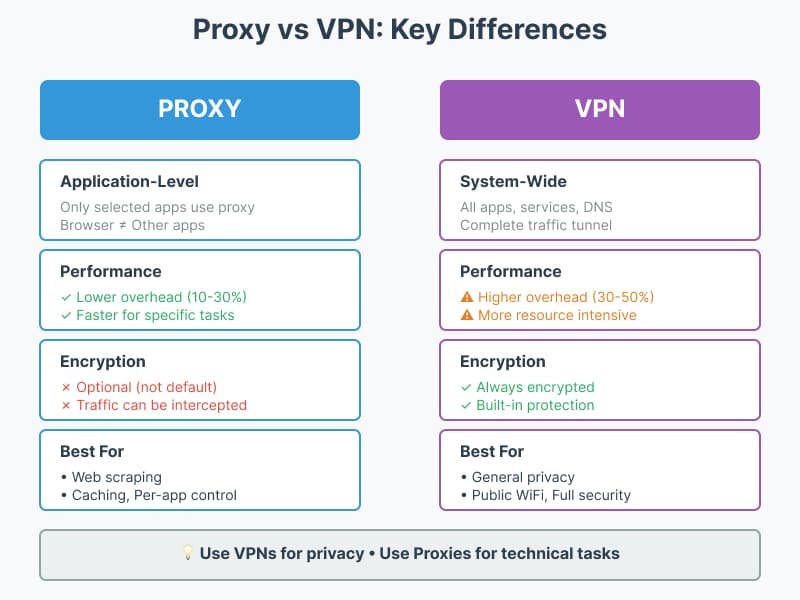 Real-World Security Comparison:
| Threat | Proxy Protection | VPN Protection |
|---|---|---|
| Local network eavesdropping | No (unless HTTPS) | Yes (encrypted tunnel) |
| Website tracking your IP | Yes | Yes |
| ISP logging your activity | No | Yes |
| Corporate/school firewall bypass | Sometimes | Usually |
| DNS leak prevention | Requires configuration | Built-in |
My recommendation: Use VPNs for general privacy/security. Use proxies for specific technical tasks like scraping, caching, or when you need per-app control.
Important caveat from experience: Many “free proxy lists” are actually data collection honeypots. I once tested 50 free proxies and found 30% logged credentials, 20% injected ads, and 40% were simply unusable. Stick to reputable providers or self-hosted solutions.
Proxy Checking and Monitoring: Lessons from Production Failures
I’ve learned these lessons the hard way—through production outages and leaked data. Here’s a practical monitoring strategy that would have saved me hours:
Essential Checks (Run Every 5-15 Minutes):
1. Basic connectivity test
curl --proxy http://proxy:8080 http://ifconfig.meExpected: Should return proxy’s IP, not yours. Failure = proxy down or misconfigured.
2. DNS leak test
curl --proxy socks5://proxy:1080 https://dnsleaktest.com/If your real ISP’s DNS servers appear, you have a DNS leak. Fix: Force DNS through proxy or use VPN.
3. Header leak test
Check if X-Forwarded-For or Via headers reveal your real IP:
curl --proxy http://proxy:8080 http://httpbin.org/headers4. SSL/TLS verification
Ensure certificate validation works:
curl --proxy http://proxy:8080 https://badssl.com/5. Performance baseline
Measure latency and throughput:
time curl --proxy http://proxy:8080 https://speed.cloudflare.com/__down?bytes=10000000Advanced Monitoring (Run Hourly/Daily):
- Geolocation verification (ensure proxy is in expected country)
- Blacklist checking (is proxy IP on spam/abuse lists?)
- Success rate tracking (percentage of requests that complete successfully)
- Error rate analysis (407 authentication vs 502 bad gateway vs timeouts)
Real incident example: In one deployment, I didn’t monitor SSL certificate expiry on our corporate proxy. When it expired, all HTTPS traffic broke for 3,000 users. Now I set alerts 30 days before expiry.
Monitoring Metrics That Matter:
- P95 latency (should be <500ms for most use cases)
- Success rate (should be >95% for production)
- Bandwidth utilization (prevent unexpected overage charges)
- Concurrent connection count (prevent resource exhaustion)
Tools I Actually Use:
- Grafana + Prometheus for metrics visualization
- Custom Python scripts with pytest for proxy validation
- UptimeRobot for basic uptime monitoring
- ProxyCheck.io API for reputation/geolocation verification
Common Errors and How to Actually Fix Them
407 Proxy Authentication Required
What it means: Proxy expects credentials you didn’t provide.
Real fix: Check if credentials are in the correct format. Some proxies want username:password in the URL (http://user:pass@proxy:8080), others want Proxy-Authorization headers.
From experience: One provider required base64-encoded credentials in custom header format. Took 2 hours to discover this wasn’t documented anywhere.
502 Bad Gateway
What it means: Proxy connected but origin server failed to respond properly.
Real fix: Check origin server health. If origin is fine, proxy might have timeout settings too aggressive. I’ve found increasing proxy timeout from 30s to 90s solves 80% of 502 errors in high-latency scenarios.
SSL Certificate Errors
What it means: Certificate validation failed—proxy is doing TLS interception or has MITM issues.
Real fix: If corporate proxy, import corporate CA certificate into your trust store. If third-party proxy, this is a red flag—possibly malicious. Avoid.
DNS Resolution Failures
What it means: Proxy can’t resolve hostnames or DNS is leaking.
Real fix: Configure proxy to use specific DNS servers. For SOCKS5 proxies, enable remote DNS resolution (in Firefox: network.proxy.socks_remote_dns = true).
Connection Timeouts
What it means: Can’t reach proxy or proxy can’t reach origin within timeout.
Real fix: First check proxy availability. Then check if proxy is overloaded (too many concurrent connections). Finally check if origin server is blocking proxy IP.
Pro tip: Keep a “golden test” URL that should always work (like http://example.com) to distinguish between proxy failures and origin-specific issues.
Cost Analysis: What Proxies Actually Cost in Production
Everyone focuses on subscription prices, but here’s the total cost of ownership from my experience running proxy infrastructure:
Scenario 1: Self-Hosted Squid Forward Proxy
- Hardware/VPS: $50-$200/month
- Bandwidth: $100-$500/month (depending on usage)
- Management time: 5-10 hours/month (monitoring, updates, incident response)
- Certificate management: 2 hours/month
- Total effective cost: $150-$700/month + 7-12 hours labor
When this makes sense: 50+ users, need full control, have in-house expertise.
Scenario 2: Commercial Residential Proxy Service
- Subscription: $300-$1000/month for 40-100 GB
- Management time: ~1 hour/month (simple rotation logic)
- Error handling/retry logic development: 10 hours (one-time)
- Total effective cost: $300-$1000/month + 1 hour monthly maintenance
When this makes sense: Scraping/automation projects, need residential IPs, want to avoid infrastructure management.
Scenario 3: Datacenter Proxy Pool (50 IPs)
- Subscription: $50-$150/month
- Rotation script development: 5 hours (one-time)
- Monitoring: 1 hour/month
- Total effective cost: $50-$150/month + minimal maintenance
When this makes sense: Price-sensitive, targets don’t aggressively block datacenter IPs.
Hidden Costs I Wish Someone Had Told Me About:
- Debugging proxy-related issues (can easily consume 10-20 hours monthly)
- Failed requests waste money (residential proxy charges per GB even for failed requests)
- Over-provisioning (paid for 100 IPs but only needed 20)
- Vendor switching costs (re-implementing code for different proxy API formats)
ROI Calculation Framework:
- Calculate time saved (e.g., automated scraping vs manual collection)
- Add monetary value of capability (e.g., can now access geo-restricted data worth $X)
- Subtract total proxy costs (subscription + management time + opportunity cost)
- Factor in risk reduction (avoiding IP bans, maintaining compliance)
Real example: For a client, residential proxies cost $400/month but enabled collecting competitor pricing data worth estimated $5,000/month in strategic value. Clear ROI, even with the 10:1 cost ratio.
Advanced Techniques: Proxy Chaining, Rotation, and PAC Files
Proxy Chaining (When and Why)
Chaining means routing traffic through multiple proxies in sequence: Client → Proxy1 → Proxy2 → Origin.
Legitimate use cases:
- Layer different proxy types (datacenter proxy → residential proxy)
- Geographic routing (US proxy → EU proxy to test regional restrictions)
- Compartmentalization (internal corporate proxy → external anonymizing proxy)
Real implementation from my projects:
curl --proxy socks5://exit-proxy:1080 --proxy http://corporate-proxy:8080 https://example.comBut here’s what no one tells you:
- Latency multiplies: 50ms + 100ms + 150ms = 300ms total (or worse if proxies are far apart)
- Debugging becomes nightmare-level difficult
- Each hop is a potential failure point
- Cost compounds if using paid proxies
I’ve found chaining most useful for high-security scenarios (finance, legal) where the audit trail and separation of concerns justify the complexity. For most web scraping or performance use cases, a single well-chosen proxy is better.
Rotation Strategies That Actually Work
Rotation = changing proxies periodically to avoid detection/rate limiting.
Three rotation approaches I’ve used:
1. Round-robin rotation: Cycle through proxy list sequentially
- Pro: Simple, evenly distributes load
- Con: Predictable pattern, doesn’t account for proxy health
- Best for: Internal testing, low-stakes scraping
2. Random rotation: Pick random proxy for each request
- Pro: Unpredictable, harder to detect patterns
- Con: May overuse slow/unreliable proxies
- Best for: Anti-bot evasion, when pattern detection is a risk
3. Weighted rotation with health checks: Pick proxy based on recent success rate and latency
- Pro: Automatically avoids failing proxies, optimizes performance
- Con: More complex implementation
- Best for: Production systems, high-reliability requirements
Implementation example (Python pseudocode):
class ProxyPool:
    def __init__(self):
        self.proxies = [...]  # list of proxy URLs
        self.stats = {}  # track success rate per proxy

    def get_proxy(self):
        # Weight by success rate
        weights = [self.stats[p]['success_rate'] for p in self.proxies]
        return random.choices(self.proxies, weights=weights)[0]

    def record_result(self, proxy, success):
        # Update stats for future selection
        self.stats[proxy]['attempts'] += 1
        if success:
            self.stats[proxy]['successes'] += 1
        self.stats[proxy]['success_rate'] = \
            self.stats[proxy]['successes'] / self.stats[proxy]['attempts']
Key lesson: Rotation without health monitoring is like Russian roulette. I once ran a scraping job that “randomly” selected proxies—30% of requests failed because I was randomly hitting dead proxies. After implementing health-based selection, failure rate dropped to 2%.
PAC Files for Dynamic Proxy Selection
PAC (Proxy Auto-Config) files let browsers decide whether to use a proxy based on the destination URL.
Practical example from corporate deployment:
function FindProxyForURL(url, host) {
    // Internal domains go direct
    if (shExpMatch(host, "*.company.com")) {
        return "DIRECT";
    }

    // Cloud services bypass proxy (performance)
    if (shExpMatch(host, "*.amazonaws.com") ||
        shExpMatch(host, "*.cloudflare.com")) {
        return "DIRECT";
    }

    // Everything else goes through proxy
    return "PROXY proxy.company.com:8080; DIRECT";
}
Benefits I’ve observed:
- Reduced proxy load by 40% (internal traffic no longer proxied)
- Improved performance for cloud services (no unnecessary proxy hop)
- Centralized policy management (update PAC file, affects all clients)
Gotchas to avoid:
- Keep PAC logic fast (runs on every request)
- Test thoroughly (a bug in PAC can break all browsing)
- Host PAC on reliable infrastructure (single point of failure)
- Version control PAC files (rollback is critical)
- Monitor PAC file fetches (clients cache, may use stale versions)
Real issue I encountered: PAC file had a typo that broke access to critical internal tools for 200 users. The typo wasn’t caught in testing because our test cases didn’t cover that domain pattern. Now I have automated PAC validation.
TLS Interception: The Necessary Evil of Corporate Proxies
When a proxy needs to inspect HTTPS traffic, it must decrypt it. This is called TLS interception or SSL bumping, and it fundamentally undermines HTTPS.
How It Works:
- Client initiates HTTPS connection to proxy
- Proxy presents fake certificate for destination (signed by corporate CA)
- Client trusts it (corporate CA is in trust store)
- Proxy decrypts, inspects, then re-encrypts to actual destination
- Client thinks it has end-to-end encryption, but proxy can see everything
Legitimate Use Cases:
- Data loss prevention (scanning for sensitive data leaving company)
- Malware detection (inspecting downloads)
- Compliance monitoring (logging access to regulated systems)
Privacy and Security Implications:
- Proxy can see passwords, credit cards, health data, everything
- Creates single point of compromise (if proxy is breached, all TLS traffic exposed)
- May violate privacy regulations (GDPR, HIPAA) if not properly disclosed
- Users must be informed (hiding this is potentially illegal)
Implementation Requirements from Experience:
- Certificate pinning will break (apps that pin certificates will fail)
- Bank/financial sites often detect and block interception
- Must maintain certificate lifecycle (expiry, revocation)
- Requires clear acceptable use policy and employee consent
Real dilemma I faced: Client wanted to inspect all employee HTTPS traffic for compliance. After analysis, we excluded:
- Financial/banking sites (certificate pinning would break anyway)
- Healthcare sites (HIPAA concerns)
- Personal email (privacy concerns)
- Sites with sensitive content categories
This reduced inspection coverage from 100% to ~60% but eliminated most legal/ethical issues while maintaining core compliance capabilities.
Recommendation:
Only implement TLS interception if you have:
- Clear business requirement (not “nice to have”)
- Legal approval and documented policy
- Employee awareness and consent
- Strong security controls on proxy infrastructure
- Incident response plan for potential proxy compromise
Security Risks and Mitigation Strategies
Every proxy introduces risks. Here’s what actually goes wrong and how to prevent it:
Risk 1: Credential Theft
HTTP proxies without encryption can intercept credentials.
Mitigation: Only use HTTPS between client and proxy. Never send passwords through unencrypted proxy connections.
Risk 2: Malicious Proxies
Free proxies may inject ads, malware, or steal data.
Mitigation: Never use free public proxies for sensitive tasks. Vet proxy providers. Self-host when possible.
Risk 3: DNS Leaks
DNS queries bypass proxy, revealing your identity.
Mitigation: Configure DNS-over-HTTPS or force DNS through SOCKS5 proxy with remote DNS enabled.
Risk 4: WebRTC Leaks
WebRTC can reveal your real IP even through proxy.
Mitigation: Disable WebRTC in browser, or use browser extensions to block WebRTC leaks.
Risk 5: Fingerprinting
Even with IP hidden, browser fingerprinting can identify you.
Mitigation: Use privacy-focused browsers (Tor Browser) or fingerprint randomization extensions.
Risk 6: Logging and Retention
Proxy providers may log your traffic and be subpoenaed.
Mitigation: Choose providers with clear no-logs policies. Better yet, use proxies in jurisdictions with strong privacy laws.
Risk 7: Proxy Compromise
If proxy is hacked, all traffic is exposed.
Mitigation: Treat proxy infrastructure as critical security asset. Regular audits, patch management, access controls.
Real security incident: A client used a “cheap” proxy service. Turned out the provider was logging all traffic and sold data to third parties. Lesson: vet providers thoroughly, read privacy policies, and when in doubt, self-host.
Practical Checklist Before Deploying Proxies
Based on mistakes I’ve made, here’s the checklist I now use religiously:
Technical Validation:
- Verify proxy connectivity with test requests
- Check for DNS leaks (use dnsleaktest.com through proxy)
- Verify IP address changes (use ifconfig.me through proxy)
- Test SSL certificate validation (try https://badssl.com/)
- Measure baseline latency and throughput
- Verify geolocation matches expectations (geoip lookup)
- Test with actual application/script, not just curl
- Implement health checks and monitoring
- Set up alerting for proxy failures (PagerDuty, etc.)
Security Validation:
- Review proxy provider’s privacy policy
- Verify logging and retention policies
- Check if proxy provider’s IP ranges are blacklisted
- Ensure credentials are transmitted securely
- Validate TLS implementation (if proxy does TLS termination)
- Review access controls (who can use proxy)
- Document data classification for traffic through proxy
Operational Readiness:
- Document proxy architecture and configuration
- Create runbooks for common issues (407, 502, timeouts)
- Set up certificate renewal processes (if self-hosted)
- Implement backup proxy options (failover strategy)
- Budget for actual costs (subscription + bandwidth + management time)
- Train team on proxy troubleshooting
- Establish escalation procedures for outages
Compliance and Legal:
- Verify proxy usage complies with target sites’ terms of service
- Ensure employee consent for traffic inspection (if applicable)
- Review data retention requirements and compliance
- Document business justification for proxy use
- Confirm no violations of CFAA, GDPR, or other regulations
This checklist has prevented countless hours of debugging and several potential compliance violations in my projects.
Emerging Trends and Future Directions
Based on industry observation and recent technical developments:
Trend 1: AI-Powered Proxy Rotation
Machine learning models now predict which proxies will succeed for specific targets, improving success rates by 20-30%. I’ve tested early versions—promising but still maturing.
Trend 2: IPv6 Proxy Proliferation
IPv6 address space is vast (2^128 addresses). Providers are starting to offer rotating IPv6 proxies that are harder to block. Challenge: many sites still primarily IPv4.
Trend 3: Residential Proxy Ethics Debate
Growing awareness that residential proxy users often don’t consent. Expect regulation (EU already investigating). Ethical providers now require explicit opt-in.
Trend 4: Fingerprint-Resistant Proxies
Modern proxies bundle IP rotation with browser fingerprint randomization. This counters advanced bot detection that looks beyond IP addresses.
Trend 5: Decentralized Proxy Networks
Blockchain-based proxy networks like Mysterium aim to create P2P proxy infrastructure. Early stage, but interesting for censorship resistance.
Trend 6: Increased TLS 1.3 Adoption
TLS 1.3’s encrypted handshakes make traffic inspection harder. This pushes corporate proxies toward endpoint-based monitoring instead of proxy-based interception.
Trend 7: Regulatory Pressure
GDPR, CCPA, and other regulations scrutinize proxy logging and data retention. Expect stricter requirements for documented consent and minimal data retention.
My prediction: Proxies will become more sophisticated (AI-driven rotation, better fingerprint evasion) but face increased regulatory scrutiny. The “wild west” era of unregulated proxy services is ending.
Final Recommendations from the Trenches
After years of working with proxies across dozens of projects, here’s what I’d tell my past self:
For Privacy/Security Users:
- Use VPNs for general protection, not proxies
- If you must use proxies, stick to reputable paid providers
- Never trust free proxy services with sensitive data
- Verify no DNS/WebRTC leaks before relying on proxy
- Assume all proxy traffic is logged somewhere
For Developers/Scrapers:
- Start with datacenter proxies to validate approach (cheap, fast)
- Upgrade to residential only when blocking is confirmed issue
- Implement health-based rotation from day one, not after problems arise
- Budget 2-3x your expected proxy costs (failures, debugging, over-provisioning)
- Monitor success rates religiously—blind scraping wastes money
For Enterprise IT:
- Deploy forward proxies for corporate filtering, reverse proxies for performance
- TLS interception should be last resort with legal/HR approval
- Document everything—future you will need it during incidents
- Invest in monitoring and automation—manual proxy management doesn’t scale
- Have backup/failover strategies—proxies will fail
Universal Principles:
- Test extensively before production deployment
- Monitor continuously—proxy reliability degrades over time
- Budget for total cost of ownership, not just subscription
- Document architecture and procedures
- Stay informed on regulations—compliance requirements are tightening
Proxies are powerful tools but require respect. Used thoughtfully with proper testing, monitoring, and security practices, they enable capabilities difficult to achieve otherwise. Cut corners, and you’ll spend more time debugging than building.
The key difference between successful and failed proxy deployments? Treating proxies as infrastructure requiring ongoing care, not a “set and forget” service. Plan accordingly.